Jos tarvitset alennusta tai apua, ota meihin yhteyttä chatin tai lehdistön kautta. KONTAKTA OSS

IPTV:n asentaminen on helppoa, kun käytössä on yhteensopiva laite, sopiva IPTV-soitin ja toimiva internet-yhteys. IPTV:tä voidaan käyttää esimerkiksi Smart TV:llä, Apple TV:llä, Android TV:llä, Fire TV Stickillä, puhelimella, tabletilla ja tietokoneella.
Tässä oppaassa käymme läpi IPTV:n käyttöönoton eri laitteilla sekä yleisiä asioita, jotka kannattaa tarkistaa ennen katselun aloittamista. Jos haluat tutustua yleisiin käyttöönoton vaiheisiin, katso myös IPTV-asennusohjeet.
Setting up IPTV usually doesn’t require any special technical knowledge. You just need a compatible device, a suitable IPTV player, and the necessary service information, such as an M3U playlist or Xtream Codes information.
Once the app is installed and the necessary information has been added, you can check the channel list and start watching. The exact installation steps depend on the device and IPTV player you are using.
On most compatible devices, basic IPTV settings can be configured in a few steps. After installing the application, the necessary service information is added to the IPTV player according to the method it supports.
IPTV:tä voidaan käyttää monilla eri laitteilla, kuten Smart TV:llä, Android TV:llä, Apple TV:llä, Fire TV Stickillä, puhelimella, tabletilla ja tietokoneella.
Valitse käyttämäsi laite alla olevista vaihtoehdoista ja tutustu sen mukaiseen IPTV:n käyttöönottoon.
IPTV-soitin voi palvelusta ja sovelluksesta riippuen käyttää esimerkiksi M3U-soittolistaa tai Xtream Codes -kirjautumistietoja. Jos haluat tietää, mitä nämä menetelmät tarkoittavat ja miten niitä käytetään, tutustu M3U- ja Xtream Codes -oppaaseen.
Suoratoiston laatu riippuu internet-yhteydestä, käytettävästä laitteesta ja IPTV-soittimesta. Vakaa yhteys auttaa vähentämään toiston keskeytyksiä ja puskurointia.
Jos kuva pysähtyy, pätkii tai IPTV alkaa jatkuvasti puskuroida, katso IPTV-puskuroinnin korjausohje.
Setting up IPTV varies slightly depending on your device and operating system. Select your device below and read the instructions for that device.
IPTV can be used on Apple TV via a compatible IPTV player. Install the appropriate app from the App Store and then add the necessary service information according to the app’s instructions.
If you have an M3U playlist or Xtream Codes data, you can learn more about how they work in the M3U and Xtream Codes guide .
You can also find general steps for setting up IPTV in the IPTV installation instructions .
IPTV:n asentaminen Smart TV:lle riippuu television käyttöjärjestelmästä ja käytettävästä IPTV-soittimesta. Asenna televisiosi kanssa yhteensopiva sovellus ja lisää tarvittavat palvelutiedot sovelluksen asetuksiin.
Esimerkiksi Net IPTV ja Set IPTV ovat IPTV-soittimia, joita voidaan käyttää tuetuilla laitteilla.
IPTV can also be used on Android and iOS phones and tablets using a compatible IPTV player.
Install the appropriate application from your device’s app store and add the necessary information provided by your service provider to the application settings.
On mobile devices, a stable Wi-Fi or mobile data connection is important for smooth streaming. If you experience stuttering or constant buffering, check out our IPTV buffering fix guide.
IPTV:n katselu tietokoneella onnistuu yhteensopivan IPTV- tai mediasoittimen avulla. Käyttöönotto riippuu käytettävästä sovelluksesta ja sen tukemasta kirjautumistavasta.
Jos käytät M3U-soittolistaa tai Xtream Codes -tietoja, tutustu M3U- ja Xtream Codes -oppaaseen.
Jos IPTV ei toimi asennuksen jälkeen, voit tarkistaa yleisimmät ratkaisut IPTV-vianmääritysoppaasta.
Android TV ja Android Box tarjoavat useita vaihtoehtoja IPTV:n käyttämiseen. Asenna yhteensopiva IPTV-soitin ja lisää sen jälkeen tarvittavat palvelutiedot.
Ennen käyttöönottoa kannattaa tarkistaa, että laite on yhdistetty internetiin ja että valittu sovellus on yhteensopiva laitteen kanssa.
Jos ongelmia ilmenee asennuksen jälkeen, tutustu IPTV ei toimi -oppaaseen.
To use IPTV on Fire TV Stick, you need a compatible IPTV player. Install the required app on Fire TV Stick and then add the service information provided by your service provider.
After installation, check that the channel list loads correctly and that streaming works normally.
For more detailed instructions, see the Firestick IPTV setup guide .
If you are using an M3U playlist or Xtream Codes, please also see the M3U and Xtream Codes guide .
If you’re experiencing buffering on your Fire TV Stick, check out our IPTV Buffering Troubleshooting Guide .
Formuler Boxin IPTV:n käyttöönotto riippuu laitteen mallista ja käytettävästä IPTV-sovelluksesta. Varmista ensin, että laite on yhdistetty internetiin ja että käytössäsi ovat oikeat palvelutiedot.
Kun IPTV-soitin on määritetty, tarkista, että kanavalista latautuu ja että sisältö toistuu normaalisti.
Jos kanavat eivät lataudu tai sovellus ei toimi odotetulla tavalla, tutustu IPTV-vianmääritysoppaaseen.
To set up IPTV with TVIP Box, follow the instructions for the device and the IPTV solution you are using. Make sure that the device is connected to the internet and that you have the necessary service information.
If your IPTV player supports M3U playlists or Xtream Codes, you can learn how they work in the M3U and Xtream Codes guide .
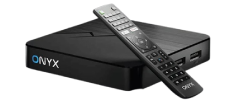
To use IPTV with Onyx Box, you need a compatible IPTV player and the necessary service information. Install the appropriate application according to the device instructions and configure the IPTV service in the application settings.
After installation, check that the channel list loads and that streaming works normally.
If your IPTV stutters or playback stops, check out our IPTV buffering fix guide .
IPTV käyttämiseen tarvitaan yleensä yhteensopiva IPTV-soitin. Käytettävä sovellus riippuu laitteesta, käyttöjärjestelmästä ja sovelluksen tukemista ominaisuuksista.
Before starting the installation, it is worth checking the following:
Once you have the necessary equipment and information ready, you can start implementing IPTV.
If IPTV does not work after installation, the problem may be related to your internet connection, application settings, login information, or the device you are using.
IPTV not working: If channels are not loading, the screen remains blank, or the app does not launch, please refer to the IPTV not working troubleshooting guide .
IPTV buffering: If the video keeps stopping or the picture is choppy, the problem could be related to your internet connection, network settings, application, or device. See our IPTV buffering fix guide for practical solutions.
Once the installation is complete, test a few channels to make sure the channel list loads properly. Also check that the video and audio are working normally.
If everything works, you can continue using IPTV on your chosen device.
You can also check out the IPTV channel list to see available channels and content.

I’m Jacob Reed, a content writer focused on streaming, digital entertainment, and modern technology. I share simple tips and useful insights to help readers enjoy better digital experiences.